tl:dr
a feature of the WordPress API V2 is giving away information such as usernames and users names (if real name was supplied).
Out of 24,662 websites test, roughly 53% are giving away information that can easily and really should be hidden from the public.
the start
I was playing round with a buddies WordPress site (on their request). Now while I unfortunately did not find anything to ruin, I mean improve their blog, I did stumble across WordPress’s API V2. Specifically the /wp-json/wp/v2/users/ endpoint which gives a lot of information away. Like below.

Now this is nothing new and even an intended “feature” of the API. However the first few questions that I had were.
- How many websites are actually disclosing the information?
- Why are sites openly advertising information that they do not need to?
- How easy is it to guess usernames from this.
To The Documentation
To answer my first Question I would need to find a way to identify that a site has this API enabled, and looking at the documentation here quite lovingly gives this information away. If you send a HEAD request the end points /wp-json/ or /?rest_route=/ you will find headers like either/or.
Link: ; rel="https://api.w.org/">
Link: ; rel="https://api.w.org/">
First problem solved.
To Shodan
Now instead of scanning the entire internet I used an amazing service called shodan and searched for part of the headers “[api.w.org]”(https://www.shodan.io/search?query=api.w.org) which returns roughly 862,748 results. Because I am a poor student and have very little time, I took a sample of 25,000 IP’s to filter through.
I then wrote a program that validated that the IP’s I had pulled from shodan were in fact WordPress sites with the API enabled, this took me almost 2 days because I am both bad and lazy at programming. However, I ended up with 24,662 websites. Not a bad sample size I think.
Guessing usernames… Not really.
As part of this research I wanted to see if we could “guess” the username’s. Now while I cannot 100% confirm this as it would require testing against sites I do not own, however it is certainly true with my test site. The slug and author link provided as part of the json response seems to give the username of the websites users. No guessing required.
The Scan, while getting side tracked
After validating which sites where what I was looking for I re worked the script to visit the api end points and tell me whether the site was giving away information or not.
Before I get into the results, I noticed something quite odd when playing with my test WordPress 4.7 site while trying block access to the endpoint with plugins.
From the information gathered, I found that I could still divulge a valid ID number. The way this worked was if the ID was valid when hitting /wp-json/wp/v2/users/ the header Allow: GET would be added to the response.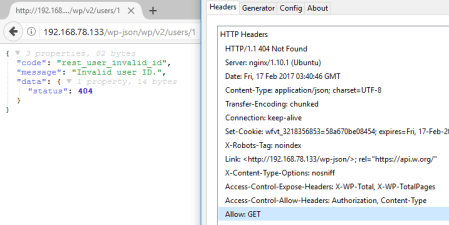
However if the endpoint /?author=<id> is accessible then using wpscan would be more beneficial.
Thankfully I realized this very early into my scan, as I added in a check that looked to see if although they were blocking this endpoint you could still enumerate ID’s by checking /user/1 and looking at the headers.
All the Profile Pictures
As a side thing to this research, the json response can give a gravatar link and looking through some of these is a good pass time. I even made a game out of it while waiting for my scans to finish.
The Results
Now for the interesting bits. I found that 8,758 (~35.5%) sites were Protected, this could mean that they have either disabled the endpoint completely or are not using the /wp/v2/ endpoints. 2,528 (~10.3%) sites were protected however ID enumeration was still possible. and a 13,098 (~53.1%) sites were giving away this information freely to the world. (For those of you who are good at math it does not add up to 100%, this is because about 1.1% of the sites failed for one reason or another)
From the 13,098 sites there were 27562 unique users, that is to say admin on test.com and admin on blah.com are unique users. From the list of users the Top 10 most common usernames where:
- admin = 3647
- user = 162
- administrator = 60
- webmaster = 58
- chris = 50
- alex = 43
- david = 42
- editor = 38
- root = 37
- matt = 35
How do I fix it?
To answer my final question, “Why are sites openly disclosing this information?”
Well I personally think that it is down to site administrators either not knowing it is there or forgetting to remove/lock down access when deploying the site. This is because the few websites that I visited were small businesses or personal websites. However, this was not the case for ALL the websites I visited.
Now if you are here looking at how to fix it, the easiest method that I can suggest is to install a plugin such as WordFence or Rest API toolbox and set them up through the dashboard. However, this is not the only way to fix this problem and I am sure with a bit of googling you can find a solution that works best for you website.
 Theodonal's musings
You must be logged in to post a comment.